Purify

Free up your PC.
Nothing leaves for good.

Purify finds the caches, build junk and forgotten files Windows keeps, tells you what each one is, and moves what you pick to the Recycle Bin. Change your mind, and it is still there.

Windows 10 and 11, 64-bit · Version 0.1.0 · No administrator rights

Purify in one loop: what is taking up space, and what it would move.

Four piles Windows leaves alone.

Every scanner reads a fixed list of known locations. Nothing outside that list shows up, every row says why it is safe to remove, and nothing is picked for you.

App caches your apps rebuild on their own.

Chrome, Edge, Brave, Vivaldi, Chromium, Firefox and Opera profile caches, Chromium's code and GPU caches, service worker storage, and package caches from Store apps. Purify also clears the three spots Windows forgets: Temp, CrashDumps and the internet cache.
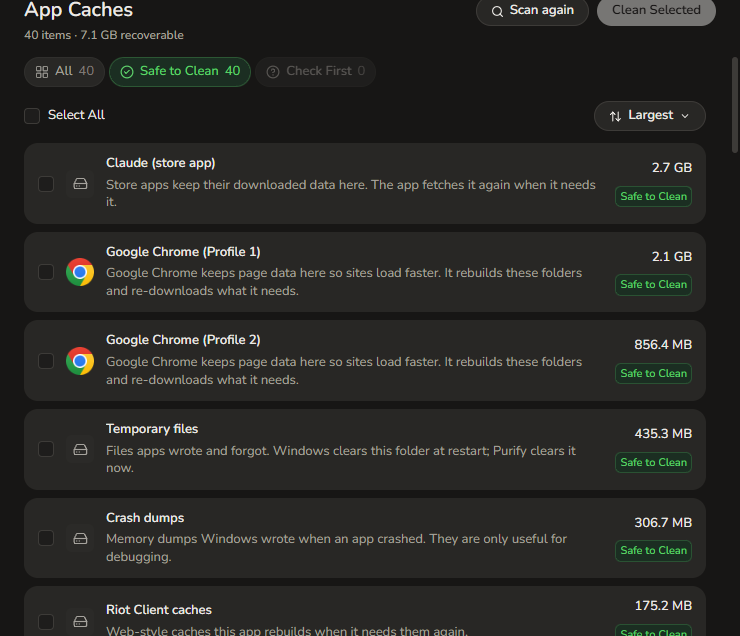
The App Caches list: rows for Claude, three Chrome profiles, Temporary files, Crash dumps and Riot Client caches, each row carrying its folder, an explanation, a size and a Safe to Clean tag.
App Caches, with the folder, the reason and the size on every row.

Build and tool caches that only grow.

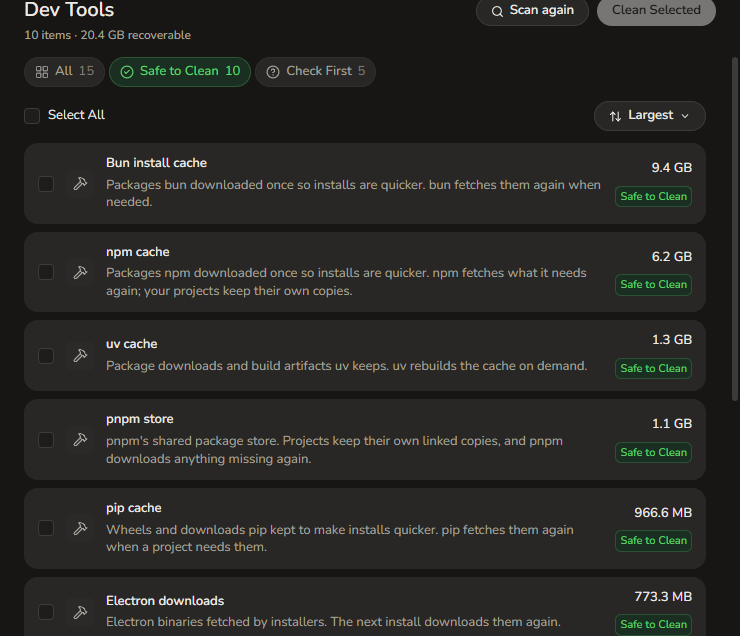
npm, node-gyp headers, pip, uv, Yarn, pnpm, Bun, Go build and module caches, Cargo crates, Electron downloads, Gradle, NuGet, VS Code extensions, Playwright browsers and Hugging Face models. The ones that cost real download time are tagged Check First and left out of the selection for you.

The Dev Tools list: rows for npm, node-gyp, pip, uv, Yarn, pnpm, Go, Cargo and Bun caches, each with its path, an explanation of why it is safe to remove, and its size.
Dev Tools: the caches behind npm, pip, Go, Cargo and the rest.

The big files you forgot were there.

Documents, Desktop, Downloads, Videos, Pictures and Music, filtered to the size you choose and sorted with the largest first. Every row carries its folder and the last time it was touched. Dependency folders such as node_modules, venv, target and dist are skipped, and virtual machine disks are labelled as such.

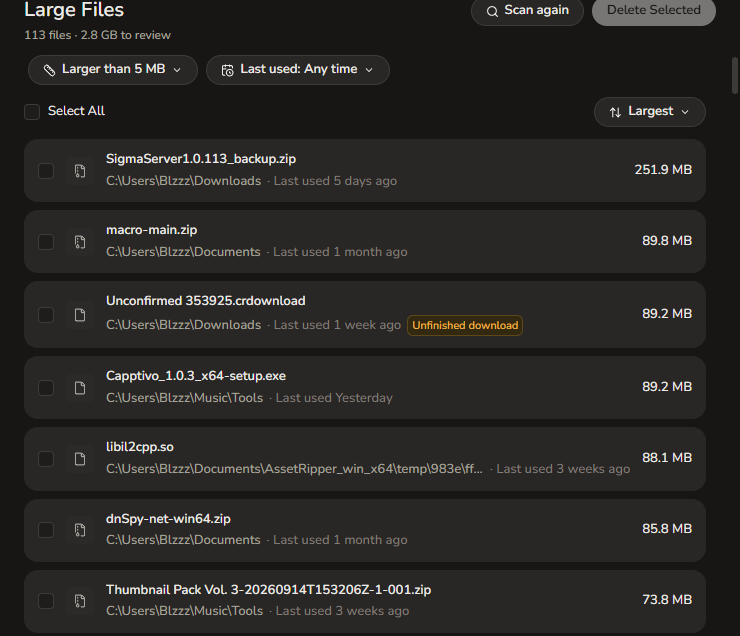
The Large Files list: filters for size and last used, then rows for big archives and installers, each showing its folder, when it was last used, a review tag where it applies, and its size.
Large Files: only the ones big enough to be worth a look.

Apps, and the folders they leave behind.

Every app Windows lists, with the space it takes and the leftovers it left in AppData, ProgramData and the rest. Run the app's own uninstaller when it has one, or let Purify move what is left. Purify will not remove itself.

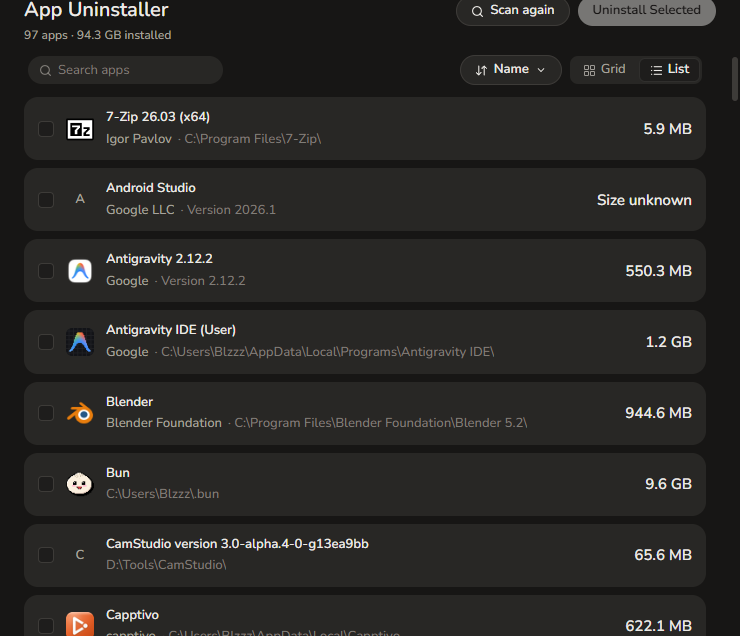
The App Uninstaller list: rows for installed apps with their publisher, install folder, last used date and size, plus a way to switch between a list and a grid of icons.
App Uninstaller: Windows' own app list, plus what each one left behind.

Nothing leaves for good.

Purify moves files to the Recycle Bin, the same place a drag and drop would put them. Deleting them for good stays your call, so a clean is never one click away from a mistake.

  • Every clean goes through the Recycle Bin, and Purify keeps showing how much is sitting there until you empty it.
  • Every row explains itself: a browser cache the app rebuilds, a tool cache it downloads again, or a file you picked.
  • Locations Purify does not recognize are not listed at all. Folders Windows shares, such as Program Files, Windows and System32, are off limits.
  • Check First rows are never selected for you. You pick them one by one.
  • No administrator rights, no background service, no telemetry.
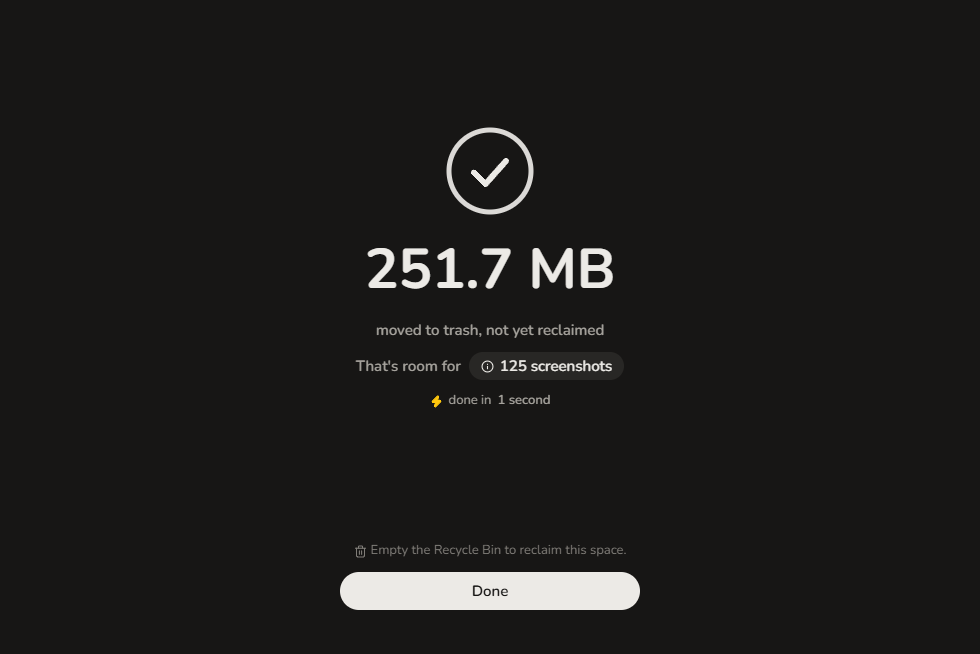
The screen after a clean: a check mark, 251.7 MB moved to trash, not yet reclaimed, with a line saying to empty the Recycle Bin to reclaim the space, and a Done button.
After a clean: moved, counted, and waiting for you to empty the bin.

One payment. It keeps working.

Purify is a one-time purchase. Buy it once and use it for as long as Windows runs it, updates included. The launch price runs while the first 50 copies last.

  • All four scanners: app caches, dev tools, large files and the uninstaller.
  • Unlimited cleans, on the Recycle Bin safety net that never turns off.
  • Every new version, with no upgrade fee.
  • A window you can size or maximise, out of the way until you open it.
$19$4.99
Launch price for the first 50 buyers, then it goes back to $19. One payment, lifetime updates. Checkout is handled by Dodo Payments; VAT and sales tax are worked out there, before you pay.

Questions a careful person asks.

What happens to the files Purify removes?

They go to the Recycle Bin, exactly as if you had dragged them there yourself. Purify has no permanent delete, so a mistake costs you a trip to the bin instead of the file.

Why did my free space not go up?

Because the files are in the Recycle Bin, where Windows still counts them against your disk. Purify says how much is waiting there. Empty the bin when you are happy with a clean, and the space comes back.

Does Purify need administrator rights?

No. It runs as your own user account, reads the places your account can already read, and never asks to elevate.

Will it touch my project folders?

Not unless you pick them. Large Files skips dependency and build folders such as node_modules, venv, target, dist, build and out, and every file it lists is there because you asked to see files that size.

Does Purify send anything anywhere?

No analytics, no account, no telemetry. The only request it makes is the update check, and only when you press the button in About.

How do I uninstall Purify?

From Windows Settings, the same way as any other app. Purify appears in the installed apps list like everything else.

What happens after I pay?

Dodo Payments takes the card and emails the receipt. The page that opens straight after checkout carries the installer and the portable build, on a link that lasts a day. After that, put the address you paid with into the updates page and the current version, or any later one, comes straight back.